VC MapVC XPlanWebinar
VC XPlan: Experiencing and communicating zoning plans in 3D
As part of our webinar on December 17, 2025, Walter Schlaghecken (District Administration of Kleve) and Elisa Dutsch (Virtual City Systems) shared insights into working with VC XPlan. Using practical examples, they demonstrated how XPlan-compliant zoning plans can be automatically visualised as 3D building envelopes directly in VC Map 6. The goal is to make planning content easier to understand, speed up review processes and create greater transparency in planning and communication.
Webinar recap: Why VC XPlan improves the readability of zoning plans
Zoning plans form the basis for municipal decision-making. At the same time, they are often difficult to understand for many stakeholders. This is exactly where VC XPlan comes in. The plugin transforms XPlan-compliant zoning plans on the fly into clear and comprehensible 3D building envelopes within VC Map 6. The practical benefits are clear:
- Planning professionals can visually review newly digitised plans more quickly and identify inconsistencies at an early stage.
- Decision-makers gain a representation that can be communicated clearly in committee meetings and council sessions.
- A clear benefit for transparency and participation: Citizens can more easily understand planned designations.
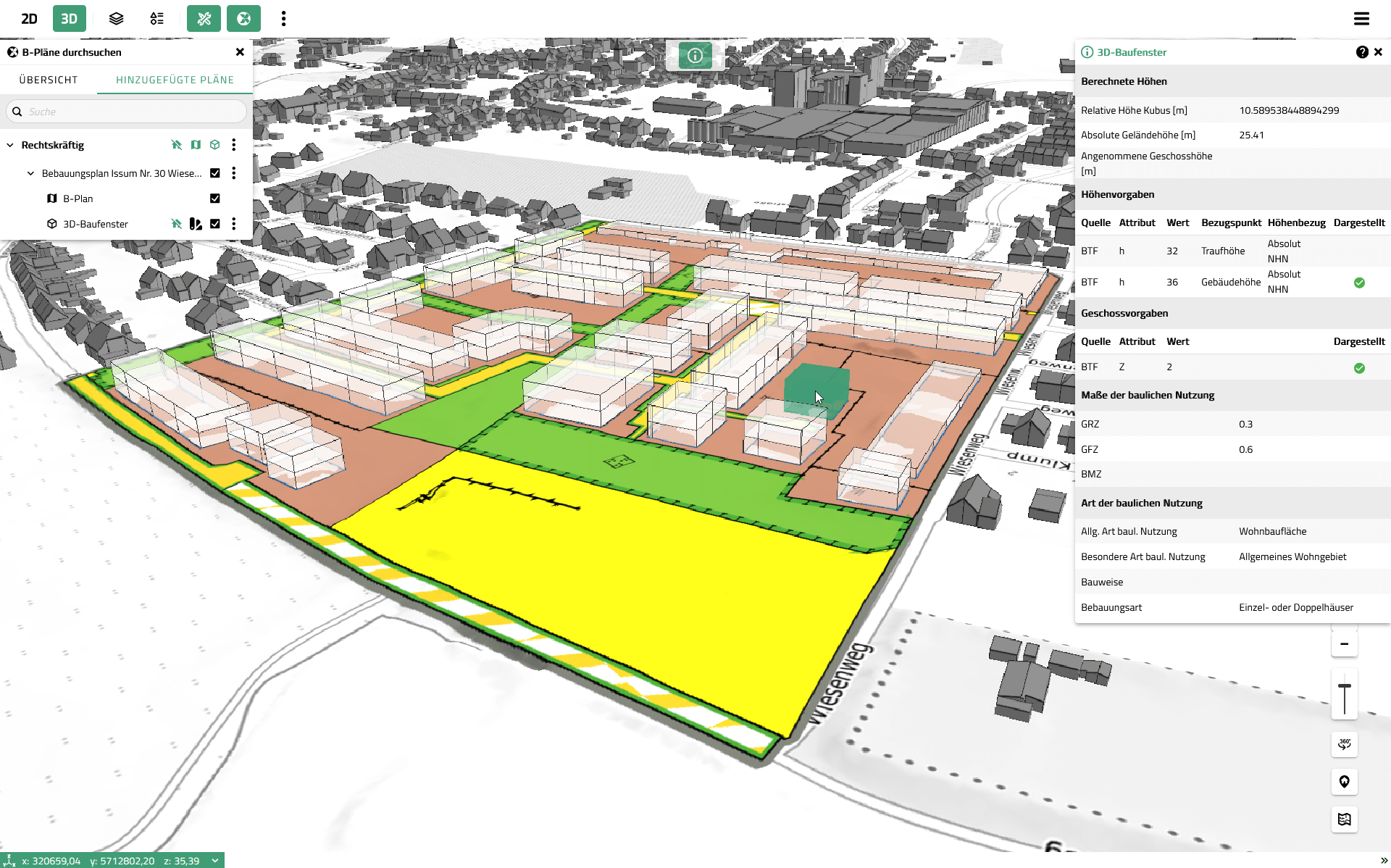
Visualisation of zoning plans in the VC Map based on XPlanung-compliant data
XPlaning as the foundation: Standardisation meets practical application
The technical basis is XPlaning. Established as the central exchange standard in land-use and spatial planning, it enables the loss-free exchange of digital planning documents.
For the 3D context, one aspect is crucial: although XPlaning primarily describes planning documents geometrically in 2D, the objects contain attributes (for example height or number of storeys) that can be interpreted in 3D. This is exactly what VC XPlan makes visible.
Fully vector-based vs. partially vector-based: When 3D really works automatically
One key practical point became clear during the webinar: whether automatic 3D visualisation is possible depends largely on how XPlan data is provided.
- Partially vector-based: Often only the plan boundary is vectorised, while the plan content itself is provided as a raster image or scan. This is sufficient for display and metadata, but hardly usable for true digital evaluation.
- Fully vector-based: Plan contents are available as individual objects with attribute data. This is the prerequisite for VC XPlan to automatically interpret the data and generate 3D building envelopes.
In short: the better the data structure, the more effectively VC XPlan can unfold its potential.
What VC XPlan shows in 3D
An important clarification: VC XPlan does not visualise a specific building. Instead, it displays the maximum buildable volume as a transparent 3D representation. This means the visualisation is:
- consistent with planning logic (it represents planning regulations),
- highly useful for communication (it shows what would be possible),
- but it is not an architectural model or an LOD2 representation.
How 3D building envelopes are generated in VC XPlan
For automatic derivation, VC XPlan primarily evaluates planning regulations that define vertical extent, typically based on:
- explicit height specifications (if available), or
- alternatively, the number of full storeys (if no explicit height is defined).
The basic logic explained in the webinar is as follows:
- Explicit height specifications take priority because they are more precise.
- If no height is specified, a plausible representation can be derived from the number of storeys combined with a standard storey height. This serves as an orientation, not as an exact construction forecast.
- To support interpretation, different visual styles can be applied, for example colour-coding based on the type of height evaluation.
Technical note
In XPlaning, height specifications can be defined in a complex way (reference system, type of restriction, reference point such as eaves or ridge height). VC XPlan applies a rule-based approach to handle these cases and ensures that all attributes remain transparent and accessible via the attribute query, even if not all information can be displayed simultaneously in the 3D cuboid.
Practical example from the District of Kleve: From XPlan data to council visualisation
The 3D visualisation complements the XPlan-compliant data base as a logical building block within the building potential register and significantly improves the communication of planning content. Walter Schlaghecken demonstrated live why the District of Kleve has taken this step. The demo scenario was particularly illustrative for everyday practice:
- finding plans using search, attribute filters and spatial filters
- compiling relevant plans for a meeting (“added plans”)
- selectively toggling existing buildings, plan layers and 3D building envelopes on and off
- preparing perspectives so that building heights and their impact on the surroundings can be discussed directly
VC XPlan as a tool for quality assurance of XPlan data
One strong takeaway from the demo: VC XPlan is not only suitable for visualisation, but also for data quality control. If expected 3D building envelopes are missing in certain areas, this can indicate that:
- required attributes (height or number of storeys) are missing from the dataset, or
- the data capture is incomplete.
This exact situation was identified during the demo and validated by comparing the dataset with the original plan PDF. A very practical workflow for municipalities that need to review data inventories or accept deliverables from external service providers.
Questions from the webinar: Key answers at a glance
Can the 3D building envelopes be exported?
Yes. During the webinar, export functionality was confirmed, including formats such as GeoJSON.
Are floor area ratio (FAR) or site coverage automatically considered?
No. VC XPlan focuses on visualising the maximum buildable volume based on height and storeys. For variant analysis and numerical evaluations, a combination with dedicated planning tools is more appropriate.
Is VC XPlan tied to a specific backend solution?
The webinar demonstrated development using the XPlan-Box as an example. In principle, other XPlan-compliant backends can also be connected via web services, depending on interfaces and project setup.
Conclusion: VC XPlan makes planning regulations easier to understand for professionals, decision-makers and the public
VC XPlan shows how standardisation through XPlaning can be translated into real, practical value. Zoning plans become more tangible in the 3D context of VC Map 6, discussions become clearer, and data quality becomes easier to assess.